Installation and system requirements
System Requirements
CaliAli runs in MATLAB and requires:
-   Signal Processing Toolbox
-   Image Processing Toolbox
-   Statistics and Machine Learning Toolbox
-   Parallel Computing Toolbox
System Compatibility and Supported Formats
Platform and format compatibility
CaliAli supports .avi / .m4v / .mp4 / .mkv / .tiff / .isxd (Inscopix), but requirements differ by operating system:
CaliAli has been successfully tested on MATLAB versions 2022a and 2023a running on Windows 11.
MATLAB does not include the codecs needed for .avi processing on Windows. Install the K-Lite Codec Pack.
MATLAB 2024a Not Supported
Due to an AppDesigner bug in MATLAB 2024a, GUI elements may be misplaced and some functions may not work properly. This issue does not occur in Windows MATLAB 2023b or on other operating systems.
Requires MATLAB 2023b
The BV_app utility requires MATLAB 2023b due to its use of newer AppDesigner functions. This utility is optional and not required to run the CaliAli pipeline.
Inscopix Users
The Inscopix Data Processing software must be installed. By default, CaliAli searches in:
C:\Program Files\Inscopix\Data Processing
If not found, you will be prompted to manually select the folder.
CaliAli has been successfully tested on MATLAB 2024a running on macOS Sonoma 14.5.
- CaliAli cannot convert Inscopix .isxd data on ARM machines. Use Inscopix software to export to .h5, uncompressed .avi, or .mp4 before running CaliAli.
CaliAli has been tested on Ubuntu 25.10 (Questing Quokka) and worked without problems.
- CaliAli cannot convert Inscopix .isxd data directly on Linux. Use Inscopix software to export to .h5, uncompressed .avi, or .mp4 before running CaliAli.
Hardware
CaliAli automatically runs in batch mode. You mainly need enough RAM for your largest session and enough storage for outputs.
Installation
Installation should take a few minutes:
- Download/clone the Git repository of the codes
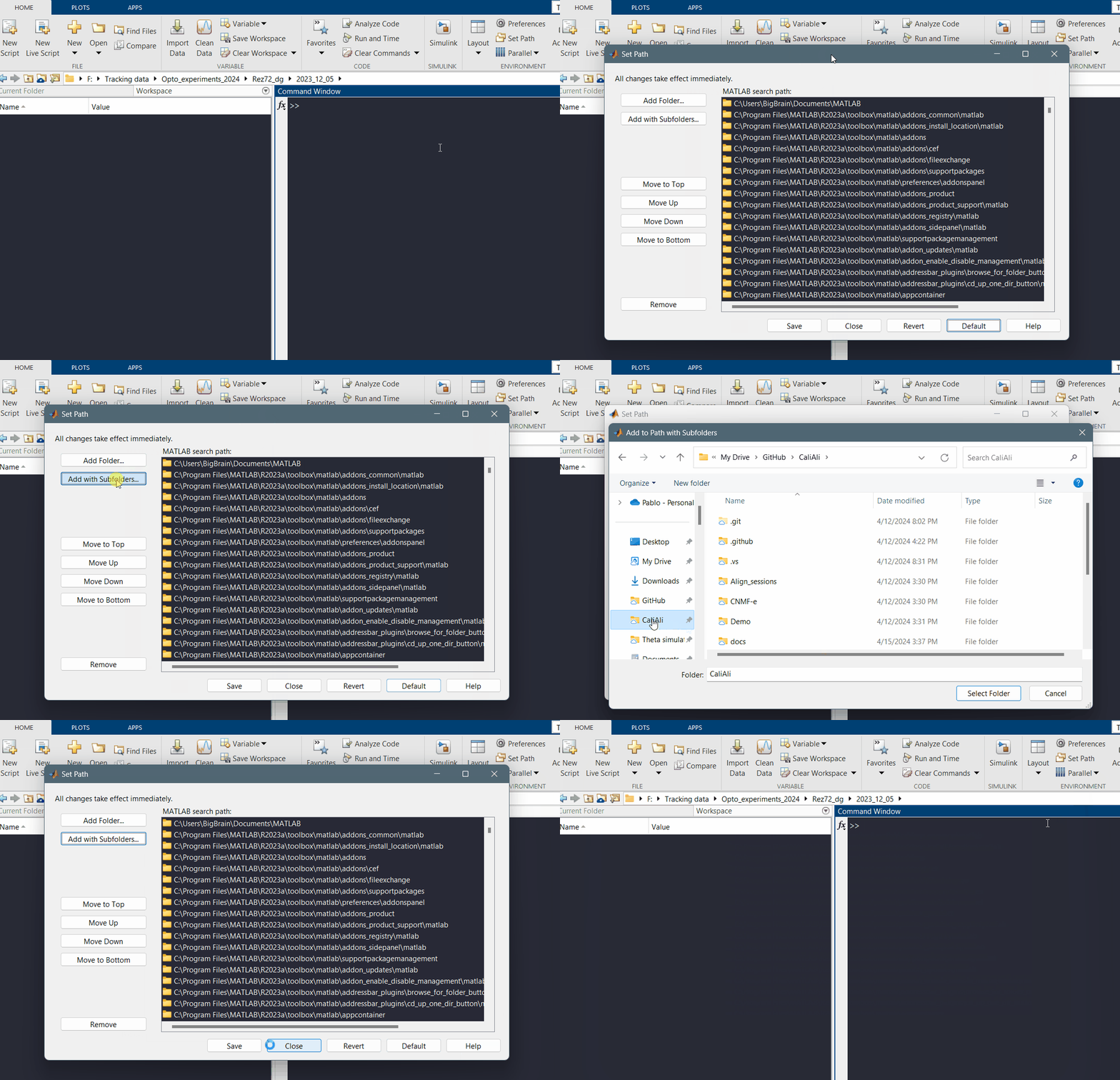
- Add the entire CaliAli repository to the MATLAB path
Already installed? Proceed to CaliAli processing steps